IndexedDB is a low-level API for client-side storage of significant amounts of structured data, including files/blobs.
Unlike the simple key-value model of localStorage, it lets you store and query objects via indexes, run transactions, and work with large volumes of data—making it ideal for offline-first web apps, progressive web apps, and anywhere you need robust local persistence.
Why IndexedDB?
- Large storage quotas: Browsers typically allow hundreds of megabytes (or even more) per origin, versus the 5 MB limit of localStorage.
- Structured objects: Store complex JavaScript objects directly—no need to stringify.
- Indexes & queries: Define secondary indexes for efficient lookups by object properties.
- Transactions: Atomic reads and writes across multiple object stores.
- Asynchronous API: Prevents UI blocking, especially important for large datasets.
Core Concepts
- Database: A logical container identified by name and version.
- Object Store: Like a table in SQL, holds records (JavaScript objects).
- Key & Key Path: Each record has a primary key. You can let IndexedDB auto-generate it or specify a key path (a property name).
- Index: Secondary lookup on object properties. Allows queries like “find all users by email.”
- Transaction: Defines scope for reading/writing. Transactions can be read-only or read-write across one or more object stores; they either fully succeed or roll back.
- Cursor: Iterates over records in an object store or index.
Opening a Database
const request = indexedDB.open('MyAppDB', 1);

request.onupgradeneeded = event => {
  const db = event.target.result;
  // Create an object store named "contacts" with auto-incremented keys
  const store = db.createObjectStore('contacts', { keyPath: 'id', autoIncrement: true });
  // Create an index on the "email" property
  store.createIndex('by_email', 'email', { unique: true });
};

request.onsuccess = event => {
  const db = event.target.result;
  // db is now ready for operations
};

request.onerror = event => {
  console.error('Database error:', event.target.error);
};
CRUD Operations
Adding or Updating Records
function saveContact(db, contact) {
  const tx = db.transaction('contacts', 'readwrite');
  const store = tx.objectStore('contacts');
  // .put() will insert or update based on the keyPath
  store.put(contact);
  return tx.complete;
}

// Usage:
request.onsuccess = e => {
  const db = e.target.result;
  saveContact(db, { name: 'Alice', email: 'alice@example.com' })
    .then(() => console.log('Saved successfully'))
    .catch(err => console.error(err));
};
Reading Records
function getContactByEmail(db, email) {
  const tx = db.transaction('contacts', 'readonly');
  const index = tx.objectStore('contacts').index('by_email');
  return index.get(email); // returns a request; wrap in Promise if you like
}

// Usage:
getContactByEmail(db, 'alice@example.com')
  .onsuccess = e => console.log('Contact:', e.target.result);
Deleting Records
function deleteContact(db, id) {
  const tx = db.transaction('contacts', 'readwrite');
  tx.objectStore('contacts').delete(id);
  return tx.complete;
}
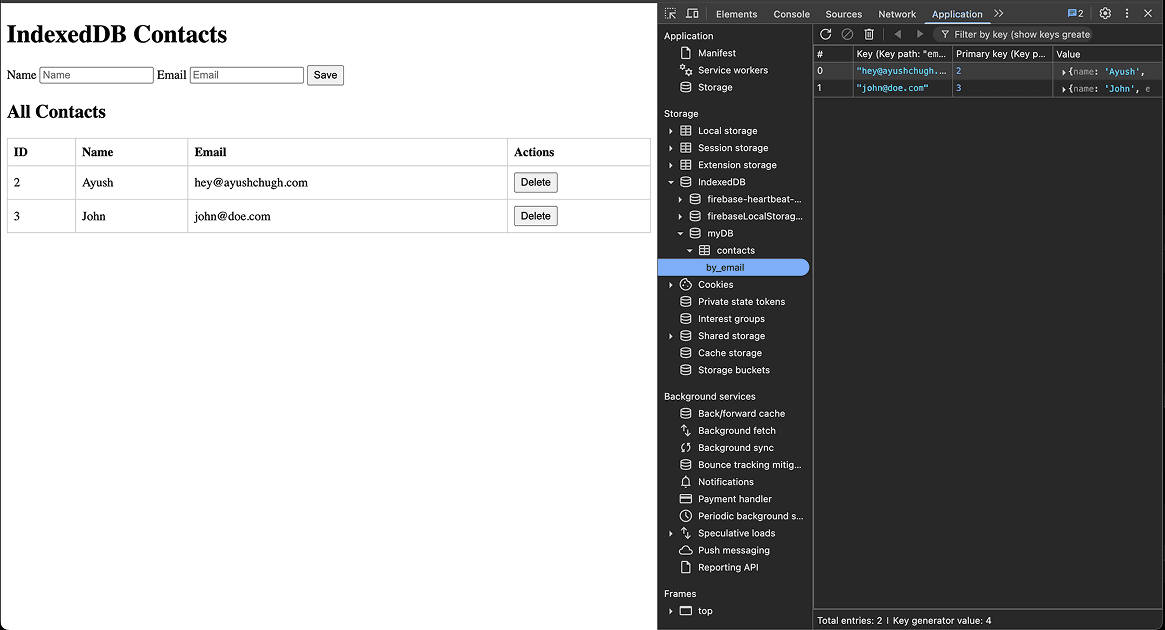
Example: Viewing and Deleting Contacts
<!DOCTYPE html>
<html lang="en">
<head>
  <meta charset="UTF-8" />
  <title>IndexedDB Contacts Example</title>
  <style>
    table { border-collapse: collapse; width: 100%; margin-top: 1em; }
    th, td { border: 1px solid #ccc; padding: 0.5em; text-align: left; }
    button { padding: 0.25em 0.5em; }
  </style>
</head>
<body>
  <h1>IndexedDB Contacts</h1>

  <form id="contactForm">
    <label for="name">Name</label>
    <input id="name" type="text" placeholder="Name" required />

    <label for="email">Email</label>
    <input id="email" type="email" placeholder="Email" required />

    <button type="submit">Save</button>
  </form>

  <h2>All Contacts</h2>
  <table id="contactsTable">
    <thead>
      <tr>
        <th>ID</th><th>Name</th><th>Email</th><th>Actions</th>
      </tr>
    </thead>
    <tbody><!-- rows injected here --></tbody>
  </table>

  <script>
    function openDB() {
      return new Promise((resolve, reject) => {
        const request = indexedDB.open("myDB", 2);
        request.onupgradeneeded = () => {
          const db = request.result;
          if (!db.objectStoreNames.contains("contacts")) {
            const store = db.createObjectStore("contacts", {
              keyPath: "id", autoIncrement: true
            });
            store.createIndex("by_email", "email", { unique: true });
          }
        };
        request.onsuccess = () => resolve(request.result);
        request.onerror   = () => reject(request.error);
      });
    }

    function saveContact(db, contact) {
      return new Promise((resolve, reject) => {
        const tx    = db.transaction("contacts", "readwrite");
        const store = tx.objectStore("contacts");
        const req   = store.put(contact);
        req.onsuccess = () => resolve(req.result);
        req.onerror   = () => reject(req.error);
      });
    }

    function getAllContacts(db) {
      return new Promise((resolve, reject) => {
        const tx    = db.transaction("contacts", "readonly");
        const store = tx.objectStore("contacts");
        const req   = store.getAll();
        req.onsuccess = () => resolve(req.result);
        req.onerror   = () => reject(req.error);
      });
    }

    function deleteContact(db, id) {
      return new Promise((resolve, reject) => {
        const tx    = db.transaction("contacts", "readwrite");
        const store = tx.objectStore("contacts");
        const req   = store.delete(id);
        req.onsuccess = () => resolve();
        req.onerror   = () => reject(req.error);
      });
    }

    async function renderContacts() {
      const db       = await openDB();
      const contacts = await getAllContacts(db);
      const tbody    = document.querySelector("#contactsTable tbody");
      tbody.innerHTML = "";
      contacts.forEach(contact => {
        const tr = document.createElement("tr");
        tr.innerHTML = `
          <td>${contact.id}</td>
          <td>${contact.name}</td>
          <td>${contact.email}</td>
          <td><button data-id="${contact.id}">Delete</button></td>
        `;
        tbody.appendChild(tr);
      });
      tbody.querySelectorAll("button").forEach(btn => {
        btn.addEventListener("click", async () => {
          const id = Number(btn.dataset.id);
          await deleteContact(await openDB(), id);
          renderContacts();
        });
      });
    }

    document.getElementById("contactForm")
      .addEventListener("submit", async e => {
        e.preventDefault();
        const name  = e.target.name.value.trim();
        const email = e.target.email.value.trim();
        if (!name || !email) return;
        const db = await openDB();
        await saveContact(db, { name, email });
        e.target.reset();
        renderContacts();
      });

    // initial render
    renderContacts();
  </script>
</body>
</html>
Output
Best Practices
- Versioning & Migrations: Handle schema upgrades carefully in
onupgradeneeded. - Error Handling: Always set
onerroron requests and transactions. - Transactions Scope: Keep transactions short; long-running ones can time out.
- Feature Detection: Fallback to
localStorageor in-memory if IndexedDB isn’t available:
if (!window.indexedDB) {
  console.warn("IndexedDB not supported — falling back.");
  // fallback logic here
}- Cleanup: Implement logic to purge stale data or compact large stores.
- Security: Never store sensitive data unencrypted.
Real-World Use Cases
- Offline-first Apps: Cache API responses and serve from IndexedDB when offline.
- Large Media Storage: Store images, audio, or video blobs.
- Form Drafts: Auto-save user inputs in progress.
- Analytics & Logs: Buffer log events locally before batching to server.
Conclusion
IndexedDB unlocks powerful client-side storage capabilities that go far beyond simple key-value stores. Whether you’re building a PWA that works offline, storing user drafts, or caching media, mastering its concepts—databases, object stores, indexes, and transactions—will help you create resilient, high-performance web applications.