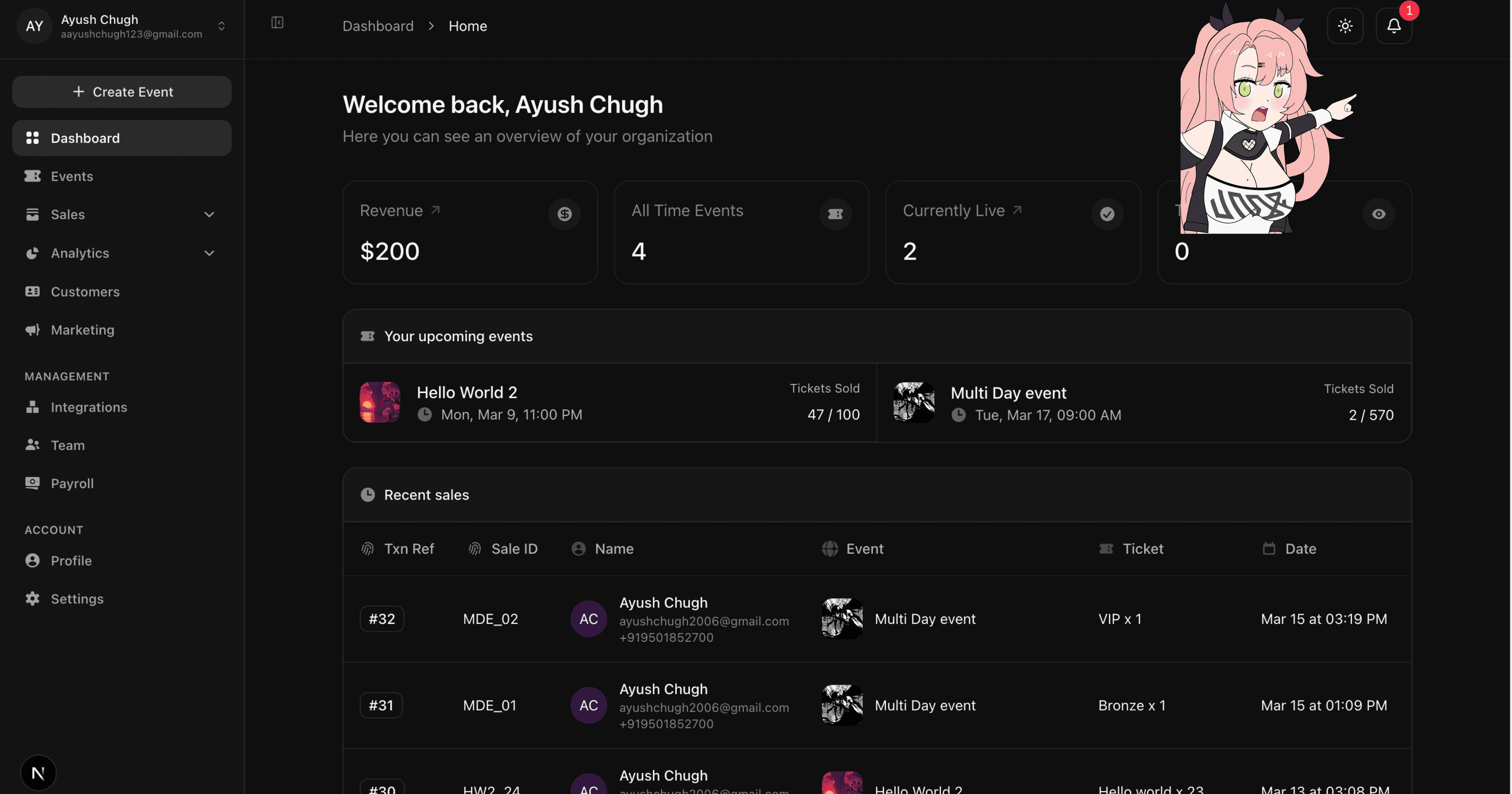
Avenue is an event ticketing platform. Organizers use it to create events and sell tickets. They manage everything from a dashboard: sales, refunds, disputes, payouts. This post is about how I built the notification system for that dashboard so the right people get notified at the right time, whether they're in the app or not. We'll stay at the system design level so you can follow along even if you've never used our product.
Overall system design
The problem we were solving
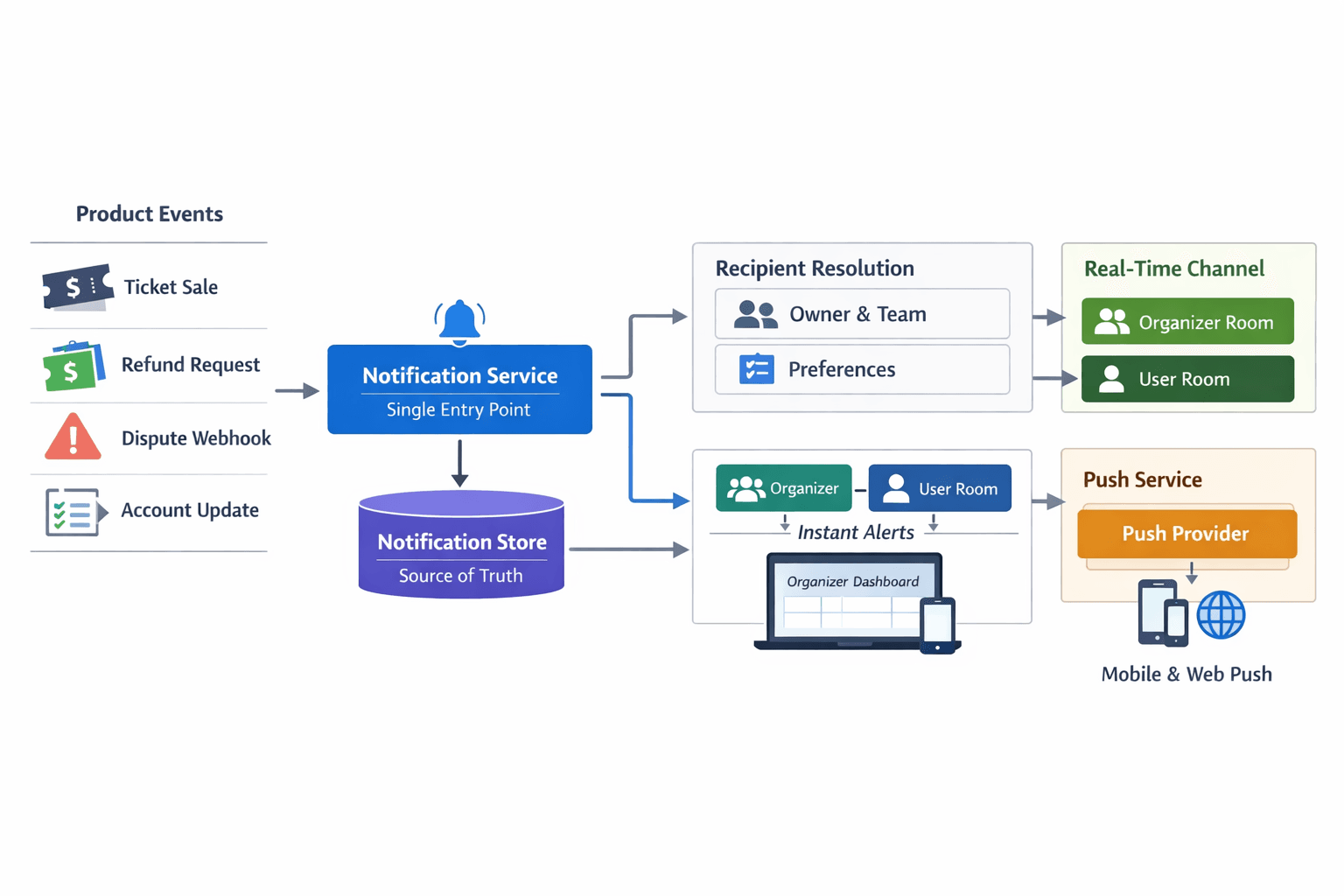
When something important happens (a new sale, a refund request, a dispute, or something the organizer needs to do like complete Stripe onboarding), we need to tell the right people. That could be the organizer who owns the account or team members who have access to sales or payments. We wanted one flow that could do three things: show the notification in the dashboard with a real-time feel, make it still there after a refresh, and send a push notification when they're not on the dashboard. We didn't want three separate systems. We wanted one "send" that handles all of it.
The core idea: the place we save notifications (we'll call it the store) is the source of truth. Real-time delivery and push are just two ways we deliver what's already in the store.
        Event Happens
 (sale / refund / dispute / action required)
                    │
                    │
                    ▼
        Notification Service
            (Single Entry Point)
                    │
                    │
                    ▼
        Notification Store
        (Source of Truth)
                    │
        ┌───────────┴───────────┐
        │                       │
        ▼                       ▼
   Real-time Delivery       Push Delivery
   (WebSocket / SSE)        (Push Provider)
        │                       │
        ▼                       ▼
  Organizer Dashboard       Mobile / Browser Push
  Instant in-app alert      When user is offline
One store, one pipeline
We keep every notification in a single store. By "store" we mean the place we persist data so it survives restarts and refreshes (in our case a database table). Each notification has who it's for, optional context like which organizer and event it belongs to, the content (title, body, image, extra data), whether it's been read, and when it was created. We can add new kinds of notifications over time without changing how the store is structured. We also index it so we can quickly list notifications by person, filter by organizer, count unread, and sort by time.
The important part: nothing else in the system writes to this store. Every notification is created through one central service. That service is the only thing that can write to the store. It can optionally skip the store, real-time delivery, or push (for future cases like ephemeral or real-time-only notifications). By default it does all three: save to the store first, then deliver in real time, then trigger push. Every part of the product that can cause a notification (a ticket sale, a refund request, a dispute webhook, an account requirement) only talks to this service. It sends a payload like "notify these people about this." It doesn't know about the store, sockets, or push. That keeps the design simple.
Inside the central service we always run the same pipeline in order. Step one: write to the store so we have a source of truth. Step two: send the notification over the real-time channel so anyone with the dashboard open sees it right away. Step three: call the push delivery service so anyone who isn't in the dashboard can get a push. We do those steps in that order every time. If the store write fails we still try real-time and push so the person might still see something. In production we don't skip the store.
                Notification Store
                (Database Table)

┌──────────────────────────────────────────────┐
│ notification_id                              │
│ user_id            → Who should receive it   │
│ organizer_id       → Optional context        │
│ event_id           → Optional context        │
│ type               → sale / refund / dispute │
│ title              → Notification title      │
│ body               → Notification body       │
│ image              → Optional image          │
│ metadata           → Extra structured data   │
│ read               → true / false            │
│ created_at         → Timestamp               │
└──────────────────────────────────────────────┘


Indexes

user_id + created_at     → fast inbox queries
organizer_id             → organizer filtering
user_id + read           → unread counts
created_at               → chronological sorting
Who gets the notification
We have to notify the right people. For organizer notifications that's the account owner and any team members who have the right permissions (for example sales, payments, or disputes). We also need to respect their preferences: some want push, some don't; some want email, some don't. We have a dedicated piece that answers "who should get this?" and "what are their preferences?" It returns the list of people and how they want to be notified. When we send a notification we save it and deliver it in real time to everyone on that list. We only send a push to people who have push enabled. That way the logic for "create this notification" stays in one place, and the logic for "who gets it" and "which channel" stays in one place too.
                   Notification Service
                           │
                           │
                           ▼
                   Recipient Resolver
      ("Who should receive this notification?")
                           │
                           ▼
               Organizer Access & Permissions
                           │
        ┌──────────────────┼──────────────────┐
        │                  │                  │
        ▼                  ▼                  ▼

   Account Owner       Team Member A      Team Member B
   permissions: all    permissions:       permissions:
                       sales, refunds     disputes

                           │
                           ▼
                 Preference Evaluation
          ("Which channels are enabled?")
                           │
        ┌──────────────────┼──────────────────┐
        │                  │                  │
        ▼                  ▼                  ▼

        User A            User B            User C
     push: enabled     push: disabled     push: enabled
     email: off        email: on          email: off

                           │
                           ▼
                    Notification Service
                           │
        ┌──────────────────┴──────────────────┐
        │                                     │
        ▼                                     ▼

   Real-time Delivery                    Push Delivery
 (all authorized users)            (push-enabled users only)
How the dashboard gets its data
The dashboard needs to show a list of notifications, an unread count, and the ability to mark things as read. It also needs to register the device for push (so we know where to send push notifications) and unregister on logout. We expose a small API for all of that. Everything is behind authentication.
The list and count can be scoped. If the logged-in person manages multiple organizers, they can see all their notifications or just one organizer's. We can also show only notifications that aren't tied to a specific organizer (user-level stuff). One store and one API power "all," "this organizer," and "user only" without building separate inboxes.
We don't store links in the store. When we send the list to the dashboard or build the push payload we figure out the right link from the notification type and context (which event, which sale, etc.). The API includes a link for the dashboard and we include a deep link for mobile push. That way we can change our routes or URL structure without migrating data. The dashboard and push always get the right links.
             Notification Store

        type: "ticket_sale"
        event_id: evt_42
        sale_id: sale_891
        metadata: {...}

                    │
                    │
                    ▼

             Notification API
         (builds links dynamically)

                    │
        ┌───────────┴────────────┐
        │                        │
        ▼                        ▼

 Dashboard Link              Push Deep Link
 /events/evt_42/sales/891    avenue://event/42/sale/891
Real-time delivery
When someone has the dashboard open we want them to see new notifications right away without refreshing. We run a real-time channel on the same server as the API. When the dashboard connects it sends both its organizer context and the user's identity. The server puts that connection into two logical rooms: one for organizer-wide events (like live cart updates) and one for that user's notifications. The central notification service always sends to the user room. So every device or tab that belongs to that person gets the new notification. One connection covers both kinds of events.
On the dashboard side, when a new notification arrives we don't try to merge it into a local list. We treat the API as the source of truth. We trigger a refresh of the list and unread count and show a toast. The next request to the API brings back the correct order and state. That keeps the UI consistent and avoids having two sources of truth (what came over the wire vs what the API says).
                     Organizer Dashboard
                           │
                           │  WebSocket Connection
                           │  (user_id + organizer_id)
                           ▼
                 Real-Time Server (API Server)
                           │
            ┌──────────────┴──────────────┐
            │                             │
            ▼                             ▼

      Organizer Room                 User Room
   (org_123 events)               (user_456 events)

  live cart updates              notifications
  live sales events              personal alerts


                           ▲
                           │
                           │
                 Notification Service
                           │
                           ▼
                     Emit Event
                     to user room


------------------------------------------------------------


              Dashboard Client Behavior

      Real-time event received
                │
                ▼

          Show toast notification

                │
                ▼

        Refresh notifications API

                │
                ▼

      API returns canonical state
  (correct order, unread count, etc.)
What the user sees
The dashboard has a bell icon in the navbar. It shows the unread count from the API. We sometimes add a synthetic item (for example "complete Stripe onboarding") if the organizer hasn't done that yet. Tapping the bell opens a slide-over panel. The panel has tabs: Sales, Disputes, Refund requests, What's New, Actions. We group notifications by type. Sales, Disputes, and Refund requests are always visible. What's New and Actions only show up when there's something in them. Inside each tab we show unread first, then read, with infinite scroll. We only load the list when the panel is open and we know which organizer they're viewing. That way we don't fetch notification data until they need it.
When they tap a notification we decide what to do from the type and the data: open the ticket viewer for a sale or dispute, open the refund dialog for a refund request, send them to Stripe for action-required, or go to the link the API gave us for everything else. We don't keep links in the frontend. We use the link from the API and handlers that know what to do for each type. When they close the panel we mark all as read for the current organizer and refresh the unread count so the badge updates.
Push notifications
Push uses the same central service and the same pipeline. When we don't skip push the service calls our push delivery layer with the payload. That layer adds the right links and talks to the external push provider. We store device tokens through the API and register them when the user logs in and unregister when they log out. On the dashboard we ask for notification permission once they're logged in and not on a public page, then send the token to our backend. So in-app notifications and push share the same "create notification" path. The only difference is the delivery channel: real-time when they're in the app, push when they're not.

Why we did it this way
Single entry point: Every feature that needs to notify someone goes through one service. That makes it easy to add logging, feature flags, or new delivery channels later without changing a bunch of call sites.
Store as source of truth: Notifications live in the store. They're durable and queryable. Real-time is an optimization. If the real-time channel goes down the next API call still shows the right state. Marking things as read is just updating the store. The next fetch or refresh shows it.
One store, scoped by organizer: We don't build a separate inbox per organizer. We use organizer and event as context and filter on them. That keeps the model simple and lets one API support "all," "this organizer," and "user only."
Computed links: We never store links in the store. We compute them when we serve the list or build the push payload. When we change routes or deep-link schemes we don't need migrations. The dashboard and push stay in sync.
Recipients in one place: "Who gets this?" and "do they want push or email?" live in one component. The rest of the system just sends a payload to the central service. It doesn't deal with permissions or preferences.
List from API, live via real-time: The list and count always come from the API. The real-time channel only triggers a refresh and toasts. We don't merge real-time payloads into a local list or worry about order. We refetch and the API is the source of truth. We only fetch the list when the panel is open, which keeps the rest of the app light.
Tabs and type-based behavior: Tabs map to notification type so we can add new types without reshaping the UI. What happens when they tap is explicit per type (ticket viewer, refund dialog, Stripe redirect, or the link from the API). Deep links and in-app actions stay consistent.
If you're building notifications for a dashboard or admin tool (organizer-facing or similar), we've found this split works well: one store, one central service, and a clear separation between "what happened" (the store), "deliver now" (real-time), and "deliver later" (push). You can adapt the same ideas to your stack and add more notification types as you go.